Efficient Design Extraction Tool for Chrome
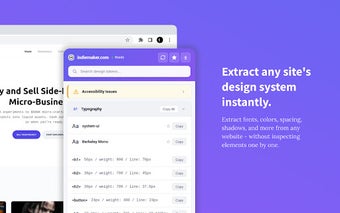
DesignClipboard is a powerful Chrome add-on designed for web designers and developers. It enables users to extract comprehensive design information from any website with a single click. The tool captures essential elements such as typography, colors, spacing, shadows, and more, allowing for streamlined access to design systems without the need to inspect elements individually. Users can easily copy values or export them in CSS or JSON format, enhancing productivity and workflow.
Key features of DesignClipboard include detailed typography extraction, including font sizes and weights, as well as color information with hex values and contrast ratios. The tool also identifies spacing elements like margins and padding, and captures borders and shadows. Additionally, it provides CSS variables used on the site, responsive breakpoints for design adaptation, and automatic accessibility checks for contrast issues, making it a comprehensive tool for modern web design.